
WhatsApp CRM 
Integrate with WhatsApp and close deals right from your CRM.

AssistAI
Automate sales and convert chats into won deals with AssistAI intelligence.
Multichannel communication
Merge communications channels and converse via a single platform.
Sales management
Organise your leads and opportunities with sales pipelines.
Lead capture
Capture leads from web forms, incoming messages, and more.
Analytics
Track performance and sales visibility through visual dashboards.
Security
Safeguard your data with multi-layered security.
Integrations
Communicate efficiently via messages, emails, and more.
Workflow automation
Automate routine tasks, lead capture, sending follow ups and more


WhatsApp CRM
Integrate with WhatsApp and close deals right from your CRM.

AssistAI
Automate sales and convert chats into won deals with AssistAI intelligence.

Multichannel communication
Merge communications channels and converse via a single platform.

Sales management
Organise your leads and opportunities with sales pipelines.

Lead capture
Capture leads from web forms, incoming messages, and more.

Analytics
Track performance and sales visibility through visual dashboards.

Security
Safeguard your data with multi-layered security.

Integrations
Communicate efficiently via messages, emails, and more.

Workflow automation
Automate routine tasks, lead capture, sending follow ups and more

Back to integration
Best CRM with Google Calendar integration


Calendar sync | Meeting scheduler | Schedule appointment | Meeting scheduling | Task, booking, meeting management
Best CRM with Google Calendar integration
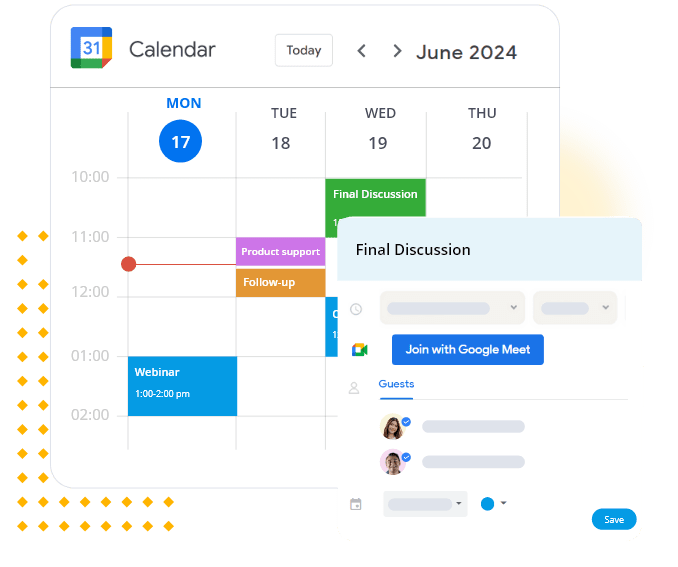
Manage meetings and events effortlessly by integrating Google Calendar within your CRM.
Supercharge your scheduling and task management with the best CRM with Google Calendar integration. This powerful integration allows you to effortlessly synchronise your personal and professional appointments, eliminating double bookings and streamlining your workflow.
Benefits of Google Calendar CRM integration


Why choose Pepper Cloud for Google Calendar integration?
Pepper Cloud excels as the leading CRM for Google Calendar integration, offering seamless connectivity and advanced features that set it apart from others:
How to integrate Google Calendar with Pepper Cloud CRM?

Google Calendar CRM integration - Application and use cases
Sales team scheduling:
Sync sales meetings and follow-ups between CRM and Google Calendar.
Automatically block out time for prospecting and customer calls.
Coordinate team schedules for joint client meetings and presentations.
Customer support management:
Project management:
Event planning and marketing:
Consultancy services:
About Google Calendar
Google Calendar is a time-management and scheduling calendar service developed by Google. It allows users to create and edit events, set reminders, and share calendars with others. With its user-friendly interface and robust features, Google Calendar has become an essential tool for personal and professional scheduling. Its ability to integrate with other applications, particularly CRM systems like Pepper Cloud, makes it an invaluable asset for businesses looking to streamline their scheduling and customer management processes.
Google Calendar CRM FAQs
Can I choose which events sync between my CRM and Google Calendar?
Yes, you can customise which types of events and specific calendars are synced between Pepper Cloud CRM and Google Calendar.
Does the integration work with multiple Google Calendars?
Can I create CRM events directly from Google Calendar?
How often does the integration sync data between Google Calendar and the CRM?
Can I control who sees my synced calendar events within the CRM?
Also popular in this category




Best CRM with Google Calendar integration - Trusted by many businesses

















Navigate the future of business with our
intuitive CRM system integrations
 24/7 Local support
- No hidden charges
- Built for Singapore SMEs